
Building a TradingView strategy no longer means you need to learn Pine Script before you can test an idea. With Xen AI for TradingView, you can describe the trading rules in normal language, generate the Pine Script v6 strategy and move straight into TradingView for compilation and backtesting.
In the video below, we build an EMA, RSI and ATR trend strategy from a short instruction, install it in TradingView and run the first backtest. We then return to Xen, add a trailing stop, update the strategy and run another backtest to see how the change affects the results. This is the complete development cycle, not just a code-generation demo.
£5 Free Credit for New Users
New users currently receive £5 of free Xen AI credit. Xen uses a pay-as-you-go system, so you don't have a monthly subscription to maintain when you are not using the service. Try Xen AI for TradingView
Start with clear instructions
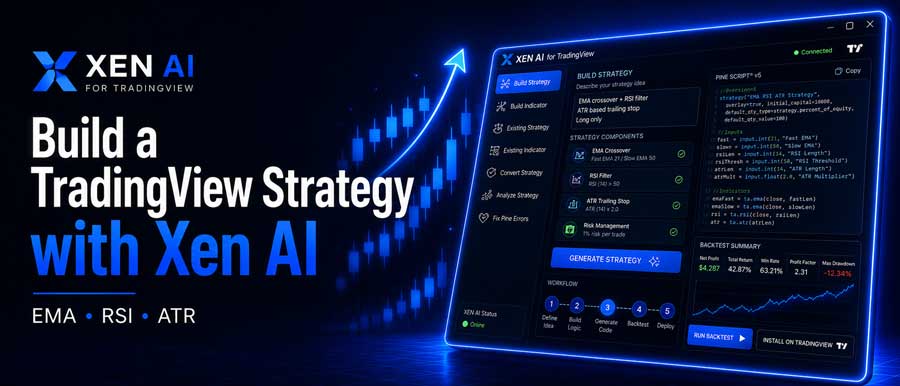
You don't need to write code or understand Pine Script syntax to get started. For the example strategy, the instructions describe the actual trading rules: an EMA crossover, an RSI confirmation filter and ATR-based risk management. Xen takes those requirements and produces the Pine Script needed to implement them.
The important part is being clear about what the strategy should do. If the rules are straightforward, a short prompt is often enough. For more complicated systems, Xen also has a Prompt Builder that helps define entries, exits, filters, stops, targets, and other requirements before the coding model starts work.
Once the strategy is generated, you can copy the code into TradingView's Pine Editor, compile it, and add it to a chart. If TradingView reports a compiler error, Xen also offers a dedicated repair workflow where you can provide the code and the error message and ask it to fix the problem.
Choose the AI model
Different coding models can approach the same trading problem in different ways, so Xen is not tied to a single AI provider. You can choose from a selection of current flagship coding models available in the workspace and use the one that best suits the task.
This is useful when a strategy is more complicated or when you want a second model to approach a problem differently. You also don't pay for a fixed monthly AI package; the selected model uses Xen credits based on the request cost.
Run the first backtest
After the strategy compiles, you can add it to a TradingView chart and test it with Strategy Tester. This gives you the first indication of how the trading logic behaves over historical data and whether the entries, exits and risk rules are doing what you intended.
Xen can also analyse TradingView backtest data. Rather than looking only at the headline profit figure, you can ask it to review the results and highlight areas that may deserve closer attention, including drawdown, trade frequency, win rate, risk-to-reward behaviour and results that appear unusually strong.
Backtest analysis does not replace proper strategy validation, but it can help you spot obvious weaknesses and suggest what to change or test next.
Add another feature
Strategy development rarely finishes with the first version. Once you see how the original rules behave, you may add a trailing stop, change the entry filter, restrict trading hours, or adjust how profits are taken.
In the video example, we return to Xen and ask it to add a trailing stop to the existing strategy. Xen updates the Pine Script instead of starting the project again, then copies the modified code back into TradingView.
You can compile and backtest the revised strategy immediately. You can then compare the new results with the previous version and decide whether the additional feature actually improved the strategy or simply changed the numbers.
Keep previous versions
When you start making changes to a strategy, tracking previous versions becomes important. Xen includes project management and version history, so you can keep developing the same strategy without losing earlier work.
If an update makes the strategy worse or pushes the code in the wrong direction, you can roll back to an earlier version instead of manually reconstructing the previous script. This is particularly useful once a strategy has been through several rounds of testing and refinement.
The project stays together with its development history, making it easier to experiment with new ideas while keeping a working version available.
Watch the complete workflow
The video shows the process from the original trading instruction through to generated Pine Script, TradingView compilation, chart installation and backtesting. It then continues with a strategy update, another compile and a second backtest, so you can see how Xen fits into an actual development workflow.
Pay only when you need it
Xen uses a pay-as-you-go credit system rather than a recurring subscription. If you build a strategy this week and don't need the service again for a month, no subscription runs in the background. You simply use credits when you have something to create, modify, repair or analyse.
For traders without programming experience, the main requirement is not coding knowledge but a clear description of the trading rules. For developers, Xen can remove much of the repetitive Pine Script work while still leaving the complete source code available for inspection and further modification.
If you have a TradingView strategy idea that you want to test, you can use the free credit to build the first version, install it in TradingView and see how it performs before deciding whether to take the project further.


