
A trading strategy written for another platform cannot simply be opened and run in MetaTrader 5, because its calculations and trading instructions must be implemented in MQL5, the language used by MT5 Expert Advisors. With Xen AI, you can use the original source code as the starting point for that conversion instead of manually rewriting the program.
This article explains how to approach a strategy conversion using a cTrader Donchian Breakout cBot as the example. The same starting principle applies to other strategies: establish what the existing program does, provide its source and dependencies, then check whether the converted EA follows those rules.
£5 Free Credit to Try Xen AI
If you have not tried Xen AI yet, you can start with £5 of introductory credit. Xen uses pay-as-you-go pricing, with no monthly subscription. Try Xen AI for MetaTrader
The strategies trade rules
The rules describe when to enter, when to exit, and how much to trade; platform-specific code handles tasks such as reading market data, submitting orders, and tracking positions. A conversion should preserve the rules while adapting those platform-specific parts. For example, if the original strategy allows only one position at a time, that restriction needs to remain in the MT5 version. If it waits for a candle to close before checking an entry, the converted EA should not start entering during the candle.
Make a short record of the original settings and expected behaviour before requesting changes; this gives you something concrete to compare against, particularly if the strategy has several filters or different rules for long and short trades.
Sharing the strategy to convert
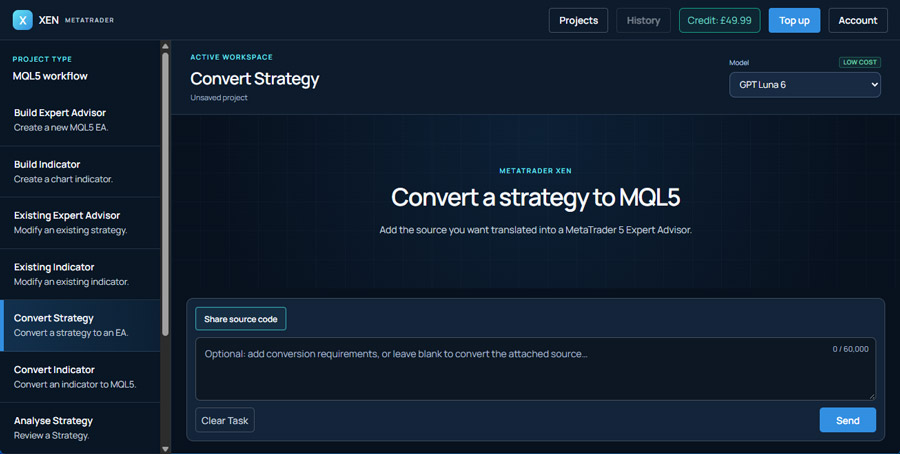
Open MetaTrader Xen AI, select the strategy conversion task, and provide the source code you own or have permission to adapt, along with any custom indicator or supporting source files it requires. A missing dependency can leave part of the strategy undefined.
In our demonstration, the starting point is a Donchian Breakout cBot written for cTrader; Xen uses that code to produce an MQL5 Expert Advisor. Rather than asking for a new breakout system, the request is to retain the existing program's behaviour. Your instructions can be brief, as long as they make the intended scope clear; you can write them in your own language and note anything that must not change.
Convert this strategy to a MetaTrader 5 Expert Advisor, preserve the entry conditions, exit rules, position sizing and input settings. Keep the original behaviour where possible, and explain any platform differences or missing dependencies that need my input.
If you only have a written strategy, Xen can help build an EA from those instructions, as that is a different starting point from converting existing code: you will need to define any rules the description leaves open. A chart image can illustrate an entry example, but it doesn't provide the complete position-management logic.
Small differences can change the trades
A familiar strategy name is not a complete specification; two programs described as a Donchian breakout can use different channel periods, entry timing or exit conditions. The source code is the reference for the particular version being converted. For this type of strategy, check which bars are included in the channel calculation and how a breakout is recognised. Also check what happens after an entry: whether further positions are allowed, how stops are applied and what triggers a close. These details determine the trades the EA takes.
Trade volume needs particular attention when moving between platforms, and just copying a numerical value does not necessarily preserve the intended exposure. The converted EA needs to use the correct sizing calculation and respect the symbol's permitted volume settings. Ask Xen to explain any assumptions it makes, as it is better to resolve an unclear rule before testing than to discover later that the EA has been trading a different interpretation of the strategy.
Backtest and test the converted strategy
Open the generated MQL5 source in MetaEditor and compile it; if errors remain, provide Xen with the current source and the compiler messages. Successful compilation confirms that the code builds, but it does not confirm that the trading rules have been reproduced correctly. Run an initial backtest in the MT5 Strategy Tester using settings that match the original strategy. Visual mode helps you follow a few entries and exits. Check whether the EA acts on the expected candle, uses the intended position size and closes for the correct reason.
If you find a mismatch, describe a specific trade, include the symbol, timeframe, settings and time of the event, then explain what you expected to happen. This gives Xen a clearer problem to investigate than a request to match the backtest results.
Different price feeds and testing assumptions can produce different results even when the rules are implemented correctly. Compare the strategy's decisions and performance figures, and follow backtesting with a demo-account test. Once you have a checked conversion, save that version before adding features. You can then request a session filter, revised risk settings or another improvement while keeping a reference copy of the original strategy.
Watch the cTrader to MT5 example
Our video shows how to convert a Donchian Breakout cBot into a MetaTrader 5 Expert Advisor with Xen AI. It provides a practical example of using existing strategy code as the basis for an MT5 version.