
If you have the NinjaScript source for an indicator or strategy and want to install it in NinjaTrader 8, Xen can package it for you. The Create Add-On tool accepts your existing code, checks it for errors, and gives you a downloadable add-on when it passes.
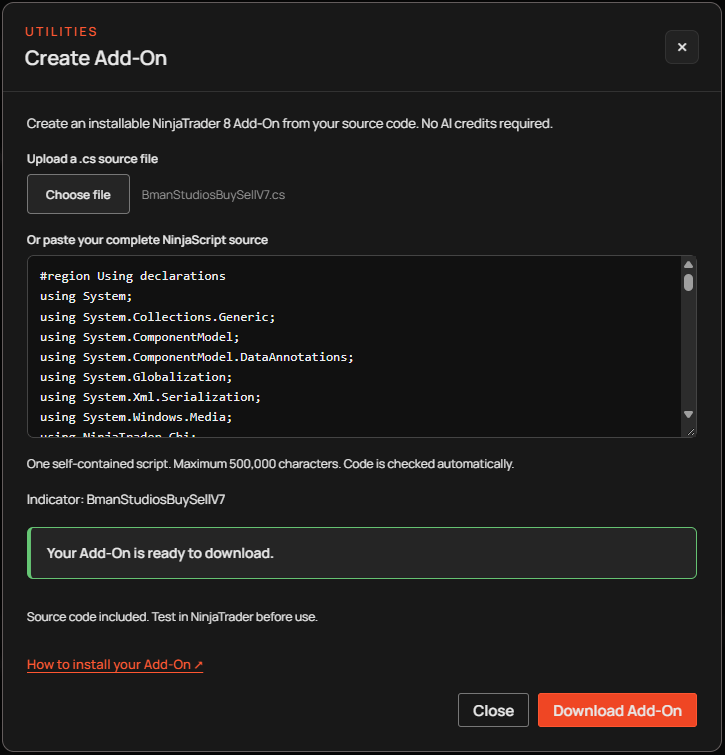
Open the Xen home page and select Create Add-On. Paste the full source for your indicator or strategy into the dialogue, then click Create Add-On to start the check. For example, if you have a custom moving average indicator saved as a .cs file, open the file and copy its contents into the dialog.
When the check passes, a download button appears. Save the add-on package and import it into NinjaTrader 8. The downloaded package is ready to install, so you don’t need to copy the source into the NinjaScript Editor and compile it yourself.
£5 Free Credit to Try Xen AI
Eligible new users can try Xen with £5 of introductory credit. Xen uses pay-as-you-go pricing with no monthly subscription. Try Xen AI for NinjaTrader
If Xen finds an error
The dialogue gives you the option to open the relevant Xen task. Choose the existing indicator task if you’re working on an indicator, or the existing strategy task for a strategy. You can then work through the reported error with Xen in that workspace.
Once you’ve fixed the error, return to Create Add-On and paste in the corrected source. Run the check again to build the package from the updated version.
Watch the NinjaTrader add-on tutorial
The video shows where to find the tool, how to open the appropriate task when Xen flags an error and where to download the finished add-on.