
Artificial intelligence has made it easier than ever for traders to create custom tools for cTrader, but many users quickly discover that getting good results depends on how clearly they describe their idea.
A trader may know exactly what they want to build, but explaining the trading logic, calculations, user interface and expected behaviour to an AI system can be challenging. A request such as "build me an RSI trading robot" leaves many important decisions unanswered.
How should entries work? When should positions close? What risk settings are required? Should the tool trade automatically or simply provide signals? This is where the new cTrader AI Prompt Builder helps.
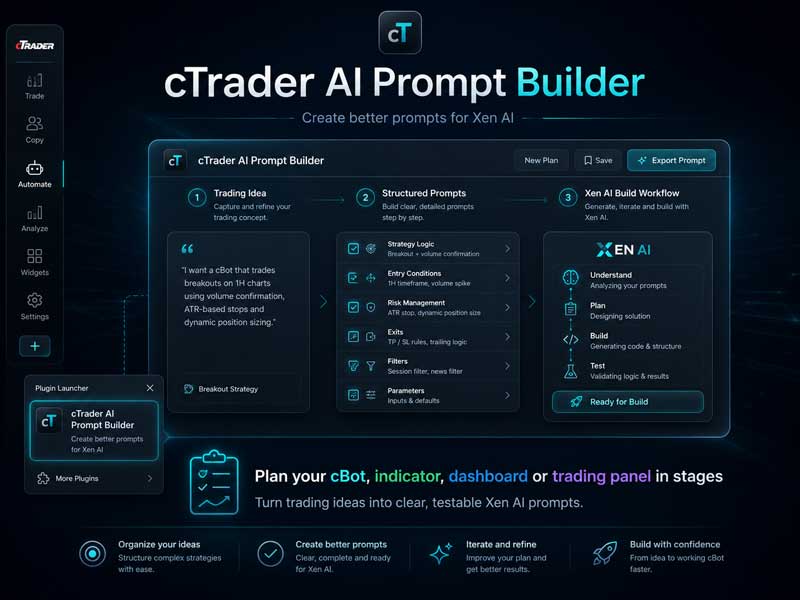
Turn Trading Ideas into Structured AI Prompts
The Prompt Builder helps transform a simple trading idea into a sequence of focused development prompts designed for Xen AI.
Instead of asking AI to create an entire project in a single request, the Prompt Builder breaks the project into smaller steps that can be built, compiled, and tested individually. This approach makes AI development more reliable because each stage can be checked before additional features are added.
Why Smaller Prompts Work Better
Large AI requests often combine many different requirements at the same time, including:
- Trading rules and entry conditions
- Position management
- Risk settings
- User interface design
- Alerts and notifications
- Calculations and data handling
When everything is requested together, it becomes harder to identify problems and easier for AI to make incorrect assumptions.
A staged development approach allows you to:
- Build the foundation first.
- Test each feature before continuing.
- Identify problems earlier.
- Preserve existing functionality.
- Develop more complex cTrader projects with less frustration.
Designed for Xen AI
The cTrader AI Prompt Builder was created specifically to support the Xen AI development workflow.
The two tools have different roles:
- cTrader AI Prompt Builder helps you define your idea and creates structured development prompts.
- Xen AI uses those prompts to build, improve and repair cTrader projects.
Together, they provide a smoother workflow:
Idea → Prompt Builder → Xen AI → Build → Test → Improve
Create Prompts for cTrader Projects
The Prompt Builder can help plan many types of cTrader Algo projects, including:
- Automated trading robots (cBots)
- Custom technical indicators
- Trading panels
- Account and market dashboards
- Risk-management tools
- Trade-management utilities
Two Ways to Use the Prompt Builder
There are two ways to access the cTrader AI Prompt Builder.
cTrader Plugin
For cTrader Desktop users, the Prompt Builder plugin provides quick access directly from the cTrader toolbar. This allows you to plan your next project while working inside the trading platform.
Open the cTrader AI Prompt Builder Plugin
ChatGPT Custom GPT
You can also access the Prompt Builder through the custom ChatGPT version. This is useful when you want to prepare your project idea before opening cTrader.
Open cTrader AI Prompt Builder
Start Building Better cTrader Tools
The quality of AI-generated results depends heavily on the quality of the request. The cTrader AI Prompt Builder removes much of the guesswork by helping traders create clearer, more structured prompts before development begins.
Whether you are building your first cBot or planning a more advanced cTrader project, the Prompt Builder provides a practical starting point before moving into Xen AI. Create better prompts, build step by step, and develop your cTrader ideas with a more structured AI workflow.


