
Knowing what you want an Expert Advisor to do and explaining it to AI are two different things; you might recognise a trading setup immediately on a chart. Still, an automated strategy needs precise instructions about when to enter, when to exit and what to do while a trade is open.
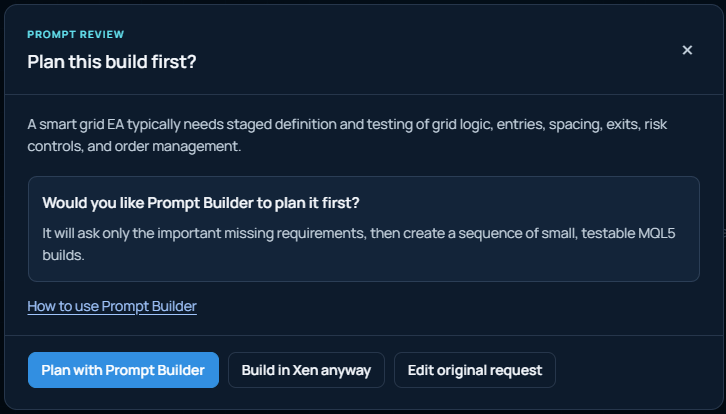
Learning how to describe your Expert Advisor to AI starts with making those decisions clear; Xen AI’s Prompt Builder helps you work through the details. When a request is vague, it asks about missing requirements and prepares a structured series of prompts for you to review and edit before coding begins.
£5 Free Credit to Try Xen AI
If you have not tried Xen AI yet, you can start with £5 of introductory credit. Xen uses pay-as-you-go pricing, with no monthly subscription. Try Xen AI for MetaTrader
You don’t need to write a technical specification before opening Xen; start by describing the strategy as you would explain it to another trader. Say what creates the trading opportunity and how you normally manage it. You can write in your own language without knowing MQL5 or using specialist AI terminology.
For example, you might start with this request:
I want an Expert Advisor that buys when a fast moving average crosses above a slow moving average and sells when it crosses below. Help me define the remaining rules before building it.
That gives Xen a starting point, but it still leaves several choices open if the moving average periods are missing, and “crosses above” could mean a crossover during the current candle or one confirmed after the candle closes. Those choices can lead to different trades, so they need to be settled before the code can accurately represent your idea.
Clarifying your requirements
When your instructions leave gaps, the Prompt Builder starts a process to capture the missing requirements. Its purpose is to help you decide what the program should do instead of leaving important behaviour open to interpretation.
For a moving average strategy, useful details include whether signals are checked on closed candles, whether another position can open while one is running, and what should happen when an opposite signal appears. Position sizing and exit rules also need to be defined. A fixed lot size, for example, is a different instruction from risking a percentage of the account on each trade.
If a question is unclear, ask Xen to explain it before choosing. The aim is to produce a description you understand and agree with, rather than accepting settings simply because the AI suggested them.
Check the requirements
Xen uses the requirements to prepare a structured series of prompts; you can read through them, correct anything that doesn’t match your intentions and add details you forgot in the original request. This gives you a chance to catch a misunderstanding before it becomes part of the program.
Pay particular attention to wording that sounds reasonable but is still open to interpretation, so “Close when the trend changes” needs a specific condition. “Use a small stop loss” needs a defined distance or calculation. If you cannot tell from the prompt exactly when an action should happen, the instruction probably needs more work.
For the moving average example, one part of the reviewed instructions might look like this:
Use a 20-period EMA and a 50-period EMA on the chart timeframe. Check for a crossover only after a candle closes. Allow one position at a time for this EA on the symbol. Close the position when a confirmed opposite crossover occurs.
This is an example of clearer wording, not a complete strategy specification; Trade size, protective stops and any other restrictions would still need to be agreed. Keep the reviewed instructions as a reference when checking the finished EA.
An indicator also needs more detail than its name or general appearance and If you ask for an EMA ribbon, you still need to decide which periods to use, how the lines should look and whether it should produce alerts. If alerts are required, specify what triggers them and whether they should wait for a candle to close.
Double-check the build against requirements
Clearer requirements reduce ambiguity, but they don’t guarantee that the generated code implements every rule correctly and once the EA or indicator has been built, compare its behaviour with the instructions you approved. Successful compilation checks that the code builds; it does not confirm that the trading logic matches your intentions.
For an Expert Advisor, follow individual trades in the MT5 Strategy Tester and check the entry timing, position size and exits. For an indicator, inspect the plotted values and any alerts on a chart. If something is wrong, refer to the specific requirement and explain what happened instead. That gives Xen a concrete issue to investigate.
Watch the Prompt Builder walkthrough
The video shows how Xen takes an initial request, asks for missing information and prepares a series of prompts for the user to review and edit. It’s a practical starting point if you have an idea for an EA or indicator but aren’t sure how to explain all the details.