
Creating a custom NinjaTrader indicator or automated strategy usually requires knowledge of C#, NinjaScript and the NinjaTrader development environment. Hiring a developer is another option, particularly for complex projects, but many trading ideas can now be prototyped and developed with an AI coding assistant.
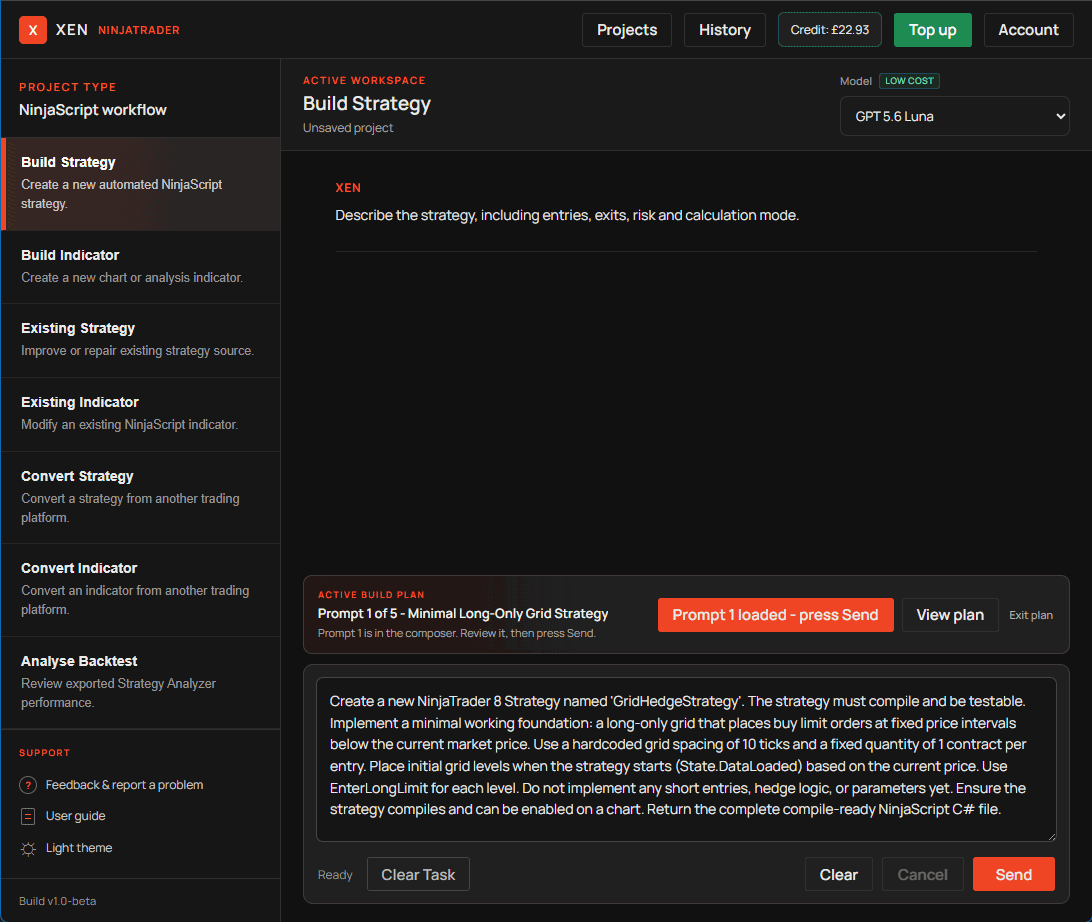
With a NinjaTrader AI coding assistant, you can describe the trading logic in plain English and use AI to generate the NinjaScript implementation. Xen AI for NinjaTrader provides a project-based workspace for building, modifying and repairing NinjaTrader indicators, strategies and other trading tools.
Build NinjaTrader Indicators with AI
AI can create custom NinjaTrader indicators when you clearly describe the calculation and expected chart behaviour. You do not need to specify every C# class or NinjaScript method, but the AI does need to understand what the indicator should calculate and display.
For example, you could ask:
Create a NinjaTrader indicator that displays the current trend using a 20 EMA and 50 EMA. Show a green signal when the 20 EMA is above the 50 EMA and a red signal when it is below. Make both EMA periods adjustable.
Xen can use those requirements to generate a NinjaScript indicator with configurable settings and chart output. You can then compile and test the resulting project in NinjaTrader. You can use the same approach for trend indicators, trading signals, session markers, alerts, dashboards, support and resistance tools, risk calculators, and other custom chart tools.
Create Automated NinjaTrader Strategies with AI
Automated strategies require more precise instructions because the code handles entries, exits, and risk management. The requirements should explain when a trade opens, when it closes and how the position should be managed.
A strategy request might look like this:
Create a NinjaTrader strategy that enters long when the 20 EMA crosses above the 50 EMA and enters short when it crosses below. Enter at the open of the next candle if the crossover remains valid. Include adjustable stop loss, profit target and trading hours.
This gives the AI specific rules it can implement in NinjaScript. A request such as “build a profitable strategy” does not provide enough information because profitability cannot be specified or guaranteed by generating code.
More Than a NinjaScript Code Generator
General-purpose AI models can generate C#, but NinjaScript has its own APIs, lifecycle and platform-specific behaviour. Code that appears reasonable in isolation may still fail to compile or behave incorrectly when it runs inside NinjaTrader. Xen adds a NinjaTrader development workflow around the AI model. You can use it to build new indicators and strategies, modify existing NinjaScript, investigate compilation errors, convert projects from other trading platforms, and analyse Strategy Analyser or backtest results.
You can also develop projects incrementally rather than trying to generate every feature in one large request. For example, you might begin with the entry and exit logic of an EMA crossover strategy, test it, then add trading hours, risk management, daily trade limits and additional filters in later stages.
Do You Need to Know NinjaScript?
You do not need advanced C# or NinjaScript knowledge to start a basic project with Xen, but you do need to understand the trading idea you want to implement. AI can write the source code, but you shouldn't expect it to invent important trading rules that haven't been defined.
Clear requirements produce a better starting point. Describe the signals, settings and expected behaviour in trading terms, then review and test the implementation that the AI produces. Experienced NinjaScript developers can use the same workflow in different ways. Instead of generating an entire project, AI can help with initial project structures, repetitive development work, modifications, code analysis and debugging.
Compile and Test AI-Generated NinjaScript
Compile and Test AI-Generated NinjaScript. Successful compilation confirms that the NinjaScript is technically valid; it does not confirm that the calculations or trading logic are correct. For automated strategies, use historical testing, NinjaTrader Strategy Analyser, Playback and simulation where appropriate. Check entries, exits, position sizing, stop losses, profit targets and session behaviour against the original requirements before considering live use.
AI can reduce manual coding in NinjaTrader development, but the trader or developer remains responsible for defining the requirements and validating the finished project.
Start a NinjaTrader AI Coding Project
Xen AI for NinjaTrader can create a new indicator or strategy from plain-English requirements or continue development from existing NinjaScript. Start with the core functionality, test the generated project and add further requirements as the project develops.


