
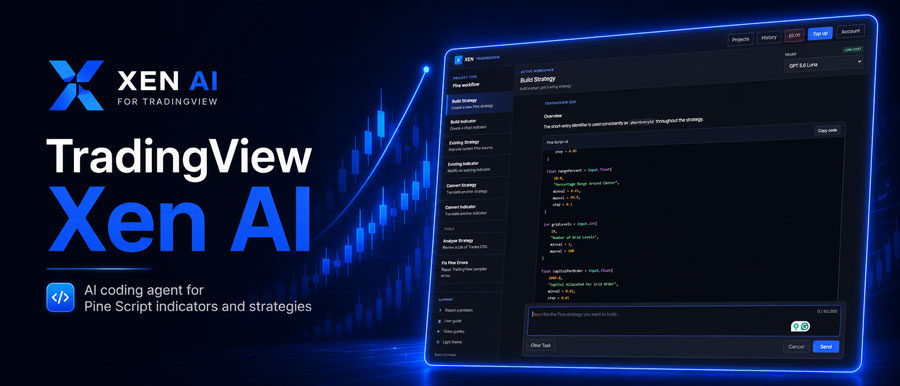
We have now released Xen AI for TradingView, following the cTrader and NinjaTrader versions. This new workspace focuses on Pine Script v6 and helps traders create indicators and strategies without writing every line of code manually.
You can start with a simple instruction such as asking Xen to build a session high and low indicator, add alerts to an existing script, or create a strategy with moving-average entries and ATR-based stops. Xen generates the Pine Script source code, which you can copy into the TradingView Pine Editor and test directly on a chart.
£5 Free Credit for New Users
New users currently receive £5 of free Xen AI credit to try the TradingView version. You can use the credit for indicator and strategy creation, code repair, conversions, and other Pine Script tasks. Try Xen AI for TradingView
What you can do with Xen
The TradingView version has been built around the tasks that come up most often when working with Pine Script. It is not limited to generating new code from scratch; you can also bring in existing scripts, ask for changes, fix compiler problems, review strategy results and convert code from other trading platforms.
- Create Pine Script v6 indicators from normal trading instructions.
- Build complete TradingView strategies with entry, exit and risk-management rules.
- Use the Prompt Builder for more detailed requirements before generating code.
- Modify existing Pine Script and add new features without starting again.
- Fix compiler errors, syntax problems and TradingView warnings.
- Analyse strategy backtest results and identify areas that need closer review.
- Convert indicators and strategies from cTrader, NinjaTrader, MetaTrader and other supported platforms.
For straightforward projects, the direct workflow is usually enough. If you want a previous-day high and low indicator, a moving-average ribbon, a session marker, or a simple entry and exit strategy, describe the idea and let Xen generate the first version of the code.
The generated Pine Script remains visible, so you are not locked into a black-box tool. You can inspect the code, change it manually, or return to Xen later and ask it to add another feature.
Help with Creating Your Prompts
The harder part of AI coding is often not the code itself, but the instructions you give the model. A strategy can sound simple when described in one sentence, but once you start looking at entry filters, sessions, stops, targets, break-even rules, alerts and position management, there are usually several details that need to be made clear.
This is where the Prompt Builder is useful. Instead of sending a rough idea straight to the coding model, it first turns the request into a more complete specification. That gives Xen a clearer set of rules to work from and reduces the assumptions it has to make during code generation. You do not need to use the Prompt Builder for everything. For smaller indicators, it's usually unnecessary, but for a strategy with several conditions, it can save time later by getting the requirements right before you write any Pine Script.
Xen Can Fix Your Bugs
Another common use is repairing or extending existing code. If TradingView reports a compiler error or warning, you can paste the script into Xen together with the message from the Pine Editor and ask it to fix the problem. This helps with issues such as invalid syntax, unsupported functions, incorrect argument types, or code written for an older Pine Script version.
Xen can also help investigate strategy problems such as repainting or lookahead bias, which can produce historical results that look much better than they would in live trading.
The same approach works when the code is already compiling but needs something added. You might want alerts, a dashboard, a higher-timeframe filter, session controls, new stop logic or another condition added to an existing indicator or strategy. In those cases, there is no reason to rebuild the whole script from the beginning.
Strategy & Indicator Conversions
If you already have an indicator or strategy written for another trading platform, Xen can use that source code as the starting point for a TradingView version. This can be useful for cTrader, NinjaTrader or MetaTrader users who want to test the same idea in Pine Script without manually rewriting the whole project.
The conversion isn't a literal line-by-line translation because the platforms handle indicators, orders, sessions, and execution differently. Xen instead works from the original logic and recreates the closest practical equivalent for TradingView. As with any platform conversion, you still need to test the finished strategy because entries and exits can behave differently once the execution model changes.
The video below gives a complete introduction to Xen AI for TradingView.
Pay as you go instead of another subscription
Xen uses a pay-as-you-go credit model rather than a recurring subscription. For traders who only need AI coding from time to time, that means you can use the service when you have a project to build or fix without paying for months when you do not need it. If you already have an indicator idea or a strategy you have been putting off because of the coding work involved, the free credit gives you a simple way to test the workflow and see how Xen handles it.


