Choosing the right AI model in Xen directly impacts the quality of your cTrader projects. The model you select affects how well your cBot or indicator is structured, how accurately logic is implemented, and how much time you spend fixing issues.
Xen provides two main options: Standard and Advanced models.
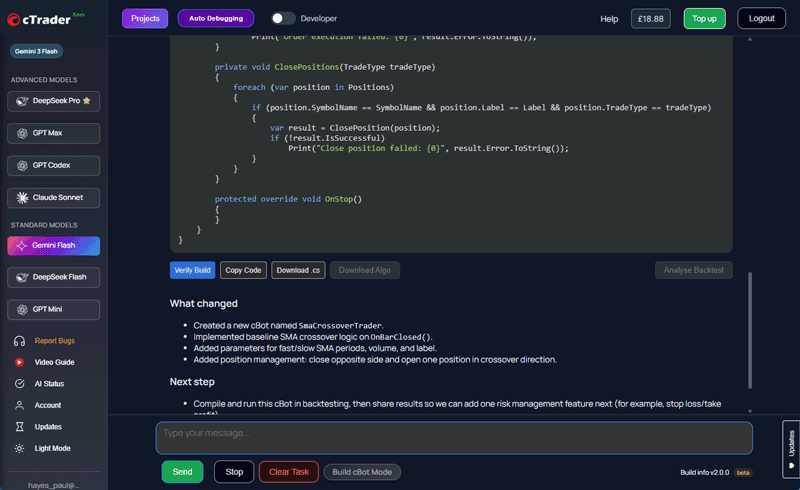
Standard models are best suited for simple tasks. If you are building a basic indicator, a straightforward cBot, or making small code changes, they are usually fast and cost-effective. They are a good starting point when testing ideas or creating an initial version of a tool.
Advanced models are more capable and should be used when complexity increases. They handle multi-condition strategies, larger systems, debugging, and code conversions more reliably. If you notice inconsistent output or logic errors, switching to an Advanced model is often the quickest fix.
It is also important to recognise that each model behaves differently. Some will structure cTrader code better, others will handle longer or more detailed prompts more effectively. There is no single model that works best in every case, so testing different options is part of the process.
A simple workflow will improve results regardless of the model you choose. Start with a basic version, test it in cTrader, run a backtest, then refine it step by step. Avoid trying to build a full system in one request, as this often leads to poor output and more rework.
In practice, many users combine both model types. Standard models are used for quick iterations, while Advanced models are used for more complex stages, such as optimisation or debugging. This approach keeps costs controlled while maintaining output quality.
If you want a full explanation, including when to switch between models, watch the video below:
https://youtu.be/4x28cZuZMMQ
You can start using Xen AI here:
https://ai.clickalgo.com