Indicator Overview
The cTrader Institutional Activity Detector is designed to estimate the probability of increased institutional participation by analysing tick volume, candle spread, and range expansion. Instead of focusing on direction, the indicator looks for abnormal market activity that may suggest stronger participation from larger market players.
The indicator calculates a Probability Score between 0 and 100 and displays it as a histogram in a separate indicator panel. When market activity exceeds the selected threshold, the indicator can highlight smart-money activity zones, volume anomalies, and large-range events directly on the chart.
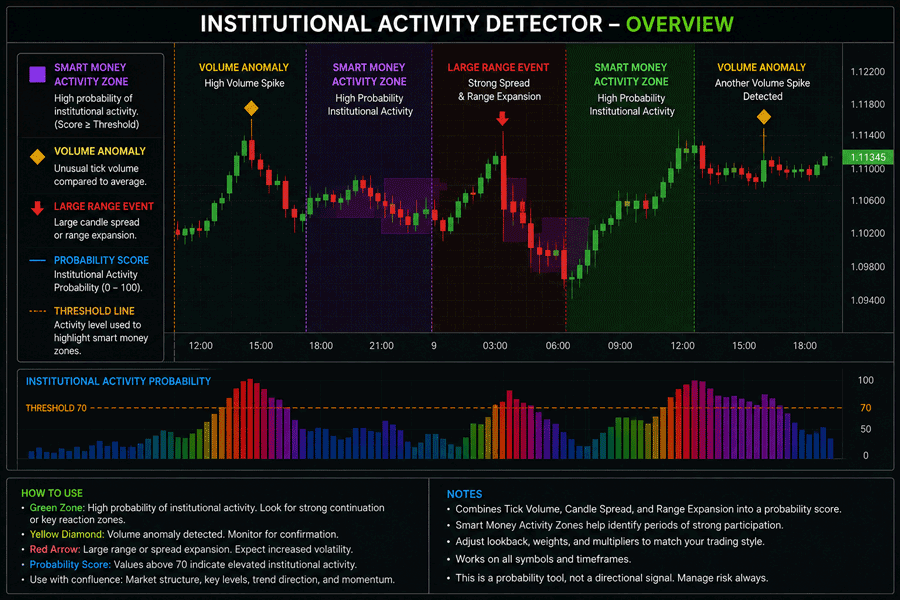
i
Institutional activity indicator, tick volume analysis, candle spread detection, range expansion monitoring, probability scoring, smart money activity zones, volume anomaly detection, and large range event markers.
Background & History
Institutional participation is often associated with changes in market behaviour. When larger players are active, traders may see unusual volume, wider candle bodies, stronger range expansion, or sudden increases in volatility. These conditions do not always reveal direction, but they can help identify when the market is becoming more active than normal.
Many traders monitor volume and volatility manually to judge whether a move has meaningful participation behind it. The Institutional Activity Detector brings these ideas together by comparing current market behaviour against recent averages and producing a single probability score.
The indicator is not designed to predict whether price will rise or fall. Its purpose is to help traders recognise when participation, spread, and range conditions are unusually elevated, which may indicate that larger market participants are active.
How the Indicator Works
The indicator compares the current candle against recent market conditions using a configurable lookback period. Tick volume is compared with average tick volume, candle spread is compared with average candle body size, and candle range is compared with average high-to-low range.
Each component is normalised into a score and then combined using adjustable weights. The final Probability Score is displayed as a histogram, with a threshold line used to identify periods of elevated activity. When the score rises above the selected threshold, smart money activity zones can be highlighted on the chart.
The indicator can also mark volume anomalies and large range events separately, allowing traders to see which type of market behaviour is contributing to the activity reading.
Key Features
The Institutional Activity Detector gives traders a structured way to identify abnormal participation and expansion conditions without manually comparing volume and candle behaviour across multiple bars.
- Calculates an Institutional Activity Probability Score from 0 to 100.
- Analyses tick volume, candle spread, and range expansion.
- Highlights smart money activity zones when the threshold is exceeded.
- Marks volume anomalies and large range events on the chart.
- Includes adjustable weights, sensitivity settings, and optional alerts.
- Works across all symbols and timeframes supported by cTrader.
How to Use it for Trading
This indicator is best used as a market participation and confirmation tool. A rising Probability Score suggests that current volume, spread, and range conditions are stronger than recent averages. This can help traders identify moments where the market may be receiving increased attention from larger participants.
High readings can be useful around breakouts, reversals, support and resistance reactions, session opens, and major news periods. For example, a breakout with a high activity score may indicate stronger participation than one with low volume and limited range expansion.
The indicator should not be used as a direct buy or sell signal. It is better used alongside price action, trend direction, support and resistance, market structure, and risk management.
Complementary Indicators
The Institutional Activity Detector works well with indicators that provide directional, structural, or volatility context.
- Support and Resistance indicators, to confirm reactions around key levels.
- Market Structure indicators, to identify trend shifts and swing behaviour.
- Volume Profile, to compare activity around important price zones.
- Average True Range, to validate volatility expansion.
- Moving Averages, to confirm broader trend direction.
- RSI or MACD, to assess momentum behaviour during high activity periods.
Inputs & Parameters
Use these settings to control the lookback period, weighting model, sensitivity levels, visual markers, and activity alerts.
| Parameter |
Default/Type |
Description |
| Core |
|
Main probability scoring settings. |
| Lookback Period |
50, int |
Number of bars used to calculate average volume, spread, and range conditions. |
| Volume Weight |
0.40, double |
Weight assigned to tick volume in the final probability score. |
| Spread Weight |
0.30, double |
Weight assigned to candle body spread in the final probability score. |
| Range Weight |
0.30, double |
Weight assigned to high-to-low range expansion in the final probability score. |
| Sensitivity |
|
Controls anomaly and expansion detection sensitivity. |
| Volume Anomaly Multiplier |
1.8, double |
Minimum volume ratio required to mark a volume anomaly. |
| Large Spread Multiplier |
1.5, double |
Minimum candle body spread ratio required to mark a large spread event. |
| Range Expansion Multiplier |
1.5, double |
Minimum candle range ratio required to mark range expansion. |
| Zones |
|
Controls institutional activity threshold behaviour. |
| Activity Threshold |
70.0, double |
Probability level required before smart money activity zones are highlighted. |
| Visuals |
|
Controls chart markers and zone display. |
| Show Smart Money Zones |
true, bool |
Shows or hides highlighted activity zones when probability exceeds the threshold. |
| Show Volume Anomalies |
true, bool |
Shows or hides chart markers for unusual tick volume activity. |
| Show Large Range Events |
true, bool |
Shows or hides chart markers for large candle spread or range expansion events. |
| Alerts |
|
Controls signal notification behaviour. |
| Enable Alerts |
false, bool |
Plays an alert sound when activity first crosses above the threshold. |
Logic Explanation
The indicator builds its probability score from three separate market behaviour readings. Tick volume measures activity, candle spread measures body size, and range expansion measures the full high-to-low movement of the candle.
Tick Volume Analysis
Compares current tick volume against recent average tick volume to detect abnormal market participation.
Candle Spread Detection
Compares the current candle body against recent average body size to detect stronger directional pressure.
Range Expansion Monitoring
Compares the current high-to-low range against recent average range to identify expanded volatility conditions.
Probability Score
Combines volume, spread, and range readings into a weighted score between 0 and 100.
Smart Money Activity Zones
Highlights candles where the probability score exceeds the selected activity threshold.
Advantages
The indicator helps traders identify unusual activity conditions more objectively by combining volume, candle spread, and range expansion into one probability score. It can be useful for confirming breakouts, reversals, news reactions, and areas where market participation appears stronger than normal.
Disadvantages
High institutional activity readings do not indicate market direction. A strong activity score can appear during bullish moves, bearish moves, breakouts, reversals, or volatile consolidation. The indicator should be used as a participation and confirmation tool rather than a standalone trading signal.
How To Install & Remove
First, ensure the cTrader trading platform is installed. Then unzip the file and double-click it to install automatically.
Built with Xen AI
This cTrader Institutional Activity Detector was created using Xen AI, the AI coding assistant from ClickAlgo, to build cTrader indicators, cBots, plugins, dashboards, and trading tools from plain English prompts.
Watch the video to see how Xen AI helped build this indicator from concept to working cTrader code.
New users can start with free credits and test Xen AI before upgrading. Learn more about Xen AI free credits.


