Indicator Overview
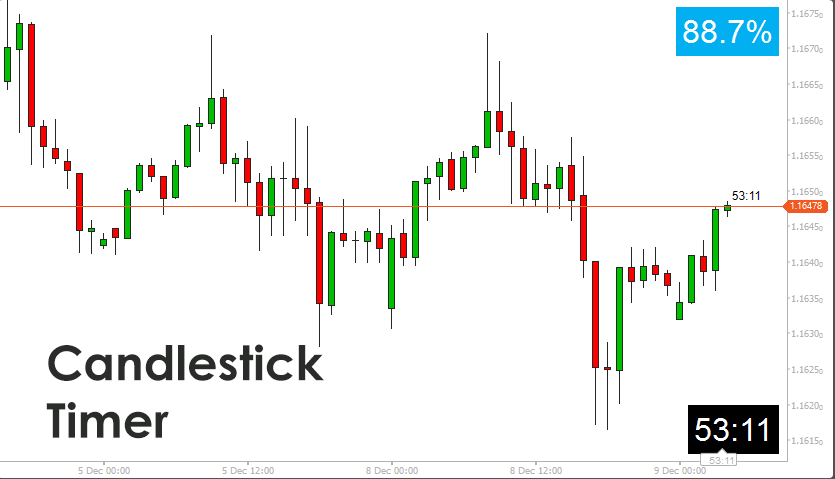
The cTrader Candlestick Timer Indicator offers a real-time view of how much time remains before the current candle closes. It calculates the countdown using the instrument’s exact timeframe, ensuring accurate readings on all time-based charts. Traders can choose from several display modes, including remaining time, elapsed time, seconds, or percentage progression. The indicator supports fixed placement on the screen or dynamic placement attached to the latest bar. It includes configurable sound alerts to notify the trader when a candle is nearing completion. Its lightweight design ensures fast performance without interfering with chart activity.
i
This tool delivers an accurate candle countdown with multiple display formats, flexible placement, and reliable alerts, providing a precise timing advantage during entries, exits, and breakout moments while maintaining a clean and unobtrusive chart presence.
Background & History
Intraday traders have long used countdown timers to refine execution, especially during fast market conditions. Traditional platforms often lack a precise and customisable timer that adapts to modern workflows. This indicator was designed to address that gap by offering a dedicated tool that is visually clear, accurate, and flexible enough for different trading styles. Over time, enhancements such as sound alerts, percentage displays, user-controlled styling, and improved candle tracking have made it a complete timing solution for both discretionary and systematic traders. Its role has expanded from a simple clock to a timing aid supporting volatility events, breakout management, and trade discipline.
How the Indicator Works
The indicator calculates the candle countdown by measuring the exact opening time of the current bar and adding the instrument’s timeframe length to determine the expected close. It then compares the platform’s server time against this value to compute remaining or elapsed time. The display updates every second and can trigger a sound alert when the candle reaches a user-defined threshold. The timer may be anchored to the candle or positioned in a chart corner.
Steps involved:
-
Analyse the open time of the current bar.
-
Add the timeframe duration to determine the scheduled close.
-
Calculate remaining or elapsed time using server time.
-
Convert the result to seconds, minutes, or a percentage based on user preference.
-
Display the countdown dynamically, refreshing every second.
-
Trigger an alert once per candle when the threshold is reached.
Key Features
This indicator provides accurate candle timing across all standard timeframes, supporting disciplined execution and improved decision-making. It includes multiple display modes, flexible positioning, and optional alerts for high-intensity trading environments.
-
Accurate time remaining, time passed, seconds, and percentage modes.
-
Fixed or dynamic placement, including attachment to the latest candle.
-
Sound alerts for candle expiry or predefined threshold.
-
Customisable colours, font size, and background.
-
Lightweight internal design for smooth operation.
How to Use it for Trading
Traders can use this timer to anticipate candle closes more accurately, improve entry timing, and manage breakout confirmation. A closing candle often marks the validity of a pattern or signal, so knowing exactly when a bar will complete is essential. Scalpers can react to micro shifts when price tests support or resistance, while swing and trend traders can wait for confirmation without constantly monitoring the clock. It also helps prevent premature entries by ensuring signals are evaluated only after the candle completes.
Guidance for practical use:
-
Observe the remaining time when waiting for a breakout confirmation.
-
Track percentage progression to monitor momentum within the candle.
-
Use sound alerts to avoid staring at the screen.
-
Combine with trend indicators to validate direction before acting.
-
Beginners can start by using the timer to avoid acting before a signal candle closes.
Quick steps:
-
Select a display mode for time or percentage.
-
Position the timer where it is easiest to see.
-
Enable alerts to mark the final seconds of the bar.
-
Wait for candle completion before making trade decisions.
Complimentary Indicators
The following indicators work well with this tool because they rely heavily on candle close confirmation.
-
Trendline Break Indicators
-
Market Structure Tools
-
Momentum Oscillators
-
Breakout or Reversal Zone Indicators
-
Volume and Volatility Tools
Inputs & Parameters
The indicator includes a set of parameters that control behaviour, styling, and alert conditions. Traders can adjust placement, display mode, fonts and colours, and alert thresholds to match their workflow.
| Parameter |
Default/Type |
Description |
| Timer Mode |
Enum |
Displays remaining time, elapsed time, seconds, or percentage progress. |
| Placement |
Enum |
Position the timer in a chart corner or attach it to the latest candle. |
| Font Size |
32 |
Controls the size of the countdown text. |
| Font Color |
Color |
Adjusts the text colour for clarity. |
| Background Color |
Color |
Sets the background behind the timer display. |
| Alert Before Close |
5 Seconds |
Triggers an alert when the candle nears completion. |
| Enable Sound Alert |
True or False |
Enables a single alert per candle. |
| Sound Type |
Enum |
Selects the platform sound played when alert conditions are met. |
Advantages
It provides reliable timing information that improves trade confirmation and helps avoid premature entries. It also reduces screen watching through automated alerts, supports structured execution, and offers clear timing for strategy testing.
Disadvantages
It does not generate trade signals on its own and requires traders to combine it with other tools for trend direction or momentum confirmation. It also depends on accurate server time and cannot predict irregular close events caused by platform or market interruptions.
How To Install & Remove
First, ensure the cTrader trading platform is installed. Then unzip the file and double-click it to install automatically.
Need Extra Help?
Get instant answers with cTrader Sensei — our free AI assistant built for the cTrader platform. It can explain the indicator settings, suggest trading strategies, and guide you step-by-step in using this indicator. Rated 4.9 out of 5 in the ChatGPT Store.
Chat with cTrader Sensei.
Prefer human help? Visit our support forum where our team and community can assist you.


