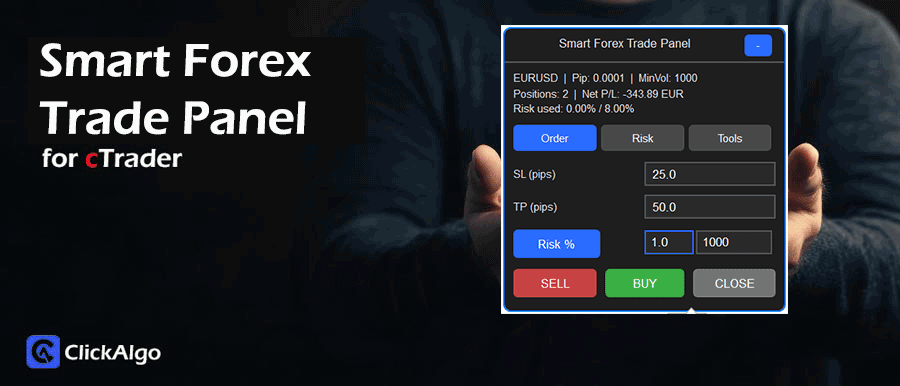
The Forex Smart Trade Panel is a semi-automated trade management cBot that replaces the default order ticket with a focused risk control dashboard. It runs on a chart and exposes three main tabs: Order, Risk and Tools. The Order tab handles SL, TP and position sizing using either fixed units or a percentage of account equity. The Risk tab shows portfolio risk, worst-case loss and remaining risk capacity. The Tools tab offers one-click break-even, trailing adjustment and global position closing. The panel is designed to help traders execute their own strategies with professional risk discipline.
Warning: ClickAlgo holds no responsibility for any losses incurred while using this tool; please use a demo account for testing purposes. This is a semi-automated Forex trade management and risk control panel cBot for cTrader, designed to execute and manage manual trades with structured position sizing and protective logic.
Background & History
This cBot was created as an educational smart trade panel for Forex traders who want better risk control without building a fully automated strategy. It builds on typical discretionary trading workflows, where traders already have entry signals from price action, indicators, or external tools. Still, often place trades with inconsistent volume or stop-loss distances. By wrapping cTrader’s risk-based volume calculation, equity drawdown checks, and modern chart controls into one compact panel, the cBot demonstrates how to structure a robust trade manager. The design also reflects current trader expectations for clean dark-themed interfaces, quick toggles and at-a-glance risk metrics.
How the cBot Works
The Forex Smart Trade Panel does not generate its own entry signals; it manages how trades are opened and controlled. The cBot reads symbol properties such as pip size, pip value, lot size, minimum and maximum volume. It tracks account equity, open positions, unrealised profit and loss, and any existing stop-loss levels.
When you type SL and TP in pips and choose either fixed volume or risk percentage, the cBot uses cTrader's built-in risk-based volume calculation to convert those inputs into a valid trade size in units. It then estimates the percentage risk, checks per-trade and total risk limits, and blocks new orders if the limits would be exceeded.
While running, it monitors equity relative to the starting value, and if the equity drawdown threshold is reached, it closes all positions and prevents new orders. Optional break-even and trailing stop logic move stop losses as price moves in your favour, using either fixed pip distances or an ATR-based volatility trail. All information is displayed directly on the chart panel via text labels, gauges, and tabs so that the trader can see positions, risk usage, and worst-case loss in real time.
Key Features
The cBot focuses on fast manual execution with strict, transparent risk control and a clear visual panel.
-
Modern on-chart trade panel with Order, Risk and Tools tabs.
-
Dual position sizing modes, fixed volume or percentage of equity.
-
SL and TP are set in pips with automatic conversion to price and volume.
-
Per trade and total open risk caps, with hard blocking when limits are exceeded.
-
Equity drawdown protection that closes all positions when the defined loss threshold is reached.
-
One-click break-even and trailing stop control using fixed or ATR-based logic.
-
Visual risk gauge, worst-case loss, and remaining risk capacity display.
How to Use it for Trading
Traders use this cBot as a control panel on any Forex or CFD symbol where they already have a strategy for bullish or bearish entries. The panel lets them turn those ideas into consistently sized trades and enforce risk rules every time they click.
-
Attach the cBot to the chart, check the default SL, TP and risk parameters and adjust them to your account and style.
-
When you see a bullish setup from your own analysis, choose Risk Percentage or Fixed Volume, confirm the SL pips that match your technical stop level and click BUY.
-
For bearish conditions, repeat the process and click SELL, keeping SL and TP aligned with the chart structure, not arbitrary values.
-
Use the Risk tab to see how much of your equity is currently at risk, how many lots you have open and what the worst-case loss would be if all stops are hit.
-
If you aim to secure profits, click Break Even once price has moved enough, or enable trailing logic so stops follow price at a fixed or ATR-based distance.
-
Beginners can start by using small risk percentages, for example, one per cent per trade, and rely on the panel to calculate correct volume and block orders if they try to risk too much.
-
Combine the panel with standard risk management rules, such as maximum total risk and daily loss limits, to keep drawdowns under control even during volatile sessions.
Inputs & Parameters
The cBot exposes a set of user inputs that control symbol filtering, position sizing, risk limits, break-even behaviour, trailing stop logic and the appearance and position of the panel on the chart. These parameters allow the trader to tune the tool for different account sizes, instruments and screen layouts while keeping the internal logic consistent.
| Parameter |
Default/Type |
Description |
| Symbol Filter Mode |
CurrentSymbol (enum) |
Controls whether the panel manages only the current chart symbol or all open symbols. |
| Volume Mode |
RiskPercent (enum) |
Selects position sizing method, either percentage risk based sizing or fixed volume in units. |
| Fixed Volume (units) |
1000.0 |
Fixed trade size in units when Volume Mode is set to FixedVolume. |
| Risk Percent |
1.0 |
Percentage of account equity to risk per trade when using risk based position sizing. |
| Default SL (pips) |
25.0 |
Initial stop loss distance in pips used to prefill the SL field on the Order tab. |
| Default TP (pips) |
50.0 |
Initial take profit distance in pips used to prefill the TP field on the Order tab. |
| Max Risk / Trade % |
2.0 |
Upper limit on percentage risk allowed for any single new trade, orders above this are blocked. |
| Max Total Open Risk % |
8.0 |
Maximum combined percentage risk across all open positions before new trades are blocked. |
| Equity DD Stop % |
15.0 |
Equity drawdown threshold from starting equity where all positions are closed and new orders are prevented. |
| Use Break Even |
true |
Enables break even stop management when the user clicks the Break Even tool. |
| BE Trigger (pips) |
15.0 |
Minimum favourable movement in pips before a stop loss can be moved to break even plus offset. |
| BE Offset (pips) |
1.0 |
Extra pip distance beyond the entry price when placing the break even stop loss. |
| Use Trailing Stop |
false |
Enables automatic trailing stop updates on each tick when turned on. |
| Trailing Mode |
FixedPips (enum) |
Chooses trailing stop method, either fixed pip distance or ATR based trailing. |
| Trailing Stop (pips) |
20.0 |
Fixed trailing stop distance in pips from current price when using FixedPips mode. |
| ATR Period |
14 |
Lookback period used for the ATR indicator when ATR trailing is selected. |
| ATR Multiplier |
2.0 |
Multiplier applied to ATR to set the volatility based trailing distance. |
| Dashboard Corner |
TopRight (enum) |
Anchor corner on the chart where the panel is displayed. |
| Horizontal Offset |
10 |
Horizontal offset in pixels from the chosen corner to fine-tune panel placement. |
| Vertical Offset |
10 |
Vertical offset in pixels from the chosen corner to fine-tune panel placement. |
| Panel Opacity |
1.0 |
Opacity level of the panel background to balance readability and chart visibility. |
| Theme |
Dark (enum) |
Switches between dark and light visual themes for the panel controls. |
Formula
The cBot uses a set of simple but robust formulas to convert user-defined SL and TP distances into risk, volume and equity-based protections. These formulas sit on top of cTrader’s internal symbol properties, ensuring risk is always calculated in account currency and expressed as a clear percentage of equity.
RiskAmount = AccountEquity × (RiskPercent ÷ 100)

PipValuePerUnit = SymbolPipValue ÷ SymbolLotSize

LossAmount = StopLossPips × PipValuePerUnit × VolumeUnits

RiskPercentPosition = (LossAmount ÷ AccountEquity) × 100

TotalOpenRiskPercent = Sum of all RiskPercentPosition values

EquityThreshold = StartEquity × (1 − (EquityDDStop ÷ 100))

BreakEvenPrice = EntryPrice ± (BreakEvenOffsetPips × PipSize)

FixedTrailingDistance = TrailingStopPips × PipSize

AtrTrailingDistance = ATR × ATRMultiplier
Advantages
The main advantage of this cBot is that it forces professional grade risk discipline while keeping the trading workflow simple. Every trade has a clearly defined stop loss in pips, a consistent risk percentage and a visible impact on total portfolio risk. The panel shows worst case loss and remaining capacity in straightforward terms, so traders avoid accidentally overleveraging. Integrated break even and trailing tools help lock in gains without constantly editing tickets, saving time and reducing emotional decisions during active sessions.
Disadvantages
This cBot does not generate trading signals, it depends entirely on the trader’s own strategy for deciding when to go long or short. Traders looking for a fully automated system with entry logic, filters and exit rules will not find that here. Because the panel centralises risk control, misconfigured parameters such as excessive risk percentages or a very high equity drawdown threshold can still lead to large losses if the trader does not apply sensible settings. New users must also become familiar with concepts such as pip value, volume units and percentage risk to get the full benefit.
How To Install & Remove
First, ensure the cTrader trading platform is installed. Then unzip the file and double-click it to install the platform automatically.
Need Extra Help?
Get instant answers with cTrader Sensei — our free AI assistant built for the cTrader platform. It can explain the indicator settings, suggest trading strategies, and guide you step-by-step in using this indicator. Rated 4.9 out of 5 in the ChatGPT Store.
Chat with cTrader Sensei.
Prefer human help? Visit our support forum where our team and community can assist you.
Note: cTrader Sensei runs on OpenAI's ChatGPT platform. To use it, you will be asked to create a free OpenAI account. Registration is quick and costs nothing.
The free version works immediately, but upgrading to a ChatGPT Plus subscription unlocks access to the latest GPT model, which provides more accurate, detailed answers for trading, coding, and product support.
Need a Broker
If you're still looking for a broker with tight spreads and fast execution, visit our top cTrader broker site.


